35 × 45 mm Passport Photo: Size Rules, Pixels at 300 PPI & 4 × 6 Printing
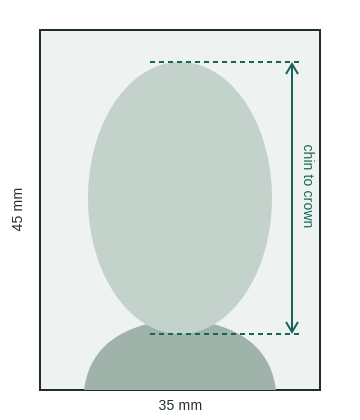
35 × 45 mm — 35 mm wide, 45 mm high — is the printed size for UK passport photos[1] and Japanese passport photos[3], and many Schengen visa applications ask for it too; the Czech foreign ministry is one example[4]. Australia accepts a range around it, 35–40 mm wide and 45–50 mm high[5], while Canada uses a larger 50 × 70 mm photo[6]. The frame is only half the rule: each issuer also sets how tall your head must be in the photo.
Photo size and head-height rules by issuer
| Issuer | Printed size (W × H) | Head height, chin to crown | Pixels at 300 PPI |
|---|---|---|---|
| UK passport | 35 × 45 mm[1] | 29–34 mm[1] | 413 × 531 px |
| Japan passport | 35 × 45 mm[3] | 32–36 mm (34 ± 2 mm)[3] | 413 × 531 px |
| Czech Republic visa (Schengen) | 35 × 45 mm[4] | See the ministry's page[4] | 413 × 531 px |
| Australia passport | 35–40 × 45–50 mm[5] | 32–36 mm[5] | 413 × 531 px at 35 × 45 mm |
| Canada passport | 50 × 70 mm[6] | 31–36 mm[6] | 591 × 827 px |
| Japanese résumé (MHLW sample form) | Photo box 24–30 × 36–40 mm[7] | Not specified | 354 × 472 px at 30 × 40 mm |
| 4 × 6 in print sheet | 101.6 × 152.4 mm | — | 1200 × 1800 px |
How to make and print 35 × 45 mm photos
Check your issuer's page first
Use the table as a starting point, then open the official page for your application. Australia's passport office, for example, recommends a professional photo provider and advises against online photo services and apps[5]; where an issuer says that, follow it.
Take the photo against a plain, light background
Face the camera in even light with a neutral expression. Keep the original file rather than a screenshot or a copy sent through a messaging app.
Set the size and PPI in the ID Photo Cropper
Enter the width and height in millimetres. Use 300 PPI for prints. For a UK online application use 600 PPI, which gives 827 × 1063 px; the UK service needs at least 600 × 750 px[2].
Frame the head, then export
Zoom until chin-to-crown fits your issuer's range, then download a single JPEG or a 4 × 6 in sheet. Print at 100% ('Actual size'), not 'Fit to page'.
Common reasons photos fail
- Head too big or too small: the frame is fixed, so the head height is what varies — 29–34 mm in the UK[1], 32–36 mm in Japan[3].
- Too few pixels for an online form: the UK digital photo must be at least 600 × 750 px and 50 KB to 10 MB[2]. A 300 PPI export (413 × 531 px) is too small.
- Scaled when printing: fitting the image to the page changes the physical millimetres.
Frequently Asked Questions
How many pixels is 35 × 45 mm?
413 × 531 px at 300 PPI and 827 × 1063 px at 600 PPI. Pixels only matter for digital uploads; printed photos are judged in millimetres.
Can I use a 300 PPI file for a UK online passport application?
No. The UK service asks for at least 600 × 750 px[2], and 35 × 45 mm at 300 PPI is only 413 × 531 px. Export at 600 PPI (827 × 1063 px) instead.
Are Canadian passport photos 35 × 45 mm?
No. Canada uses 50 × 70 mm with a face height of 31–36 mm[6]. Enter those values in the cropper instead.
Sources
Checked against the original pages on November 8, 2026. Requirements change; the official page always wins.
- Photos for passports: photo requirements — GOV.UK
- Photos for passports (digital photos) — GOV.UK
- パスポート申請用写真の規格 (passport photo specification) — Ministry of Foreign Affairs of Japan
- Photo — Ministry of Foreign Affairs of the Czech Republic
- Passport photos — Australian Passport Office
- Passport photos — Immigration, Refugees and Citizenship Canada
- 履歴書様式例 (sample résumé form, PDF) — Ministry of Health, Labour and Welfare, Japan